How Does Google Ads Work? A Complete Beginner’s Guide to Google Ads
Why Google Ads Is One of the Most Powerful Advertising Platforms
Type “plumber near me” into Google right now, and before you even scroll to the organic results, you’ll see a handful of ads sitting right at the top. That’s Google Ads in action — and it’s why a platform running on a 25-year-old auction model still drives a huge share of Google’s ad revenue every year.
For businesses, the appeal is obvious: you’re not hoping someone stumbles onto your website. You’re showing up the exact moment someone’s actively searching for what you sell. That’s the core reason so many business owners eventually ask the same question — how does Google Ads work, and can it actually work for me?
What You’ll Learn in This Guide
This guide walks through the whole thing in plain language: what Google Ads is, how the auction actually decides which ads show up, how bidding and Quality Score work together, and what a genuinely well-built campaign looks like. We’ll also get into common mistakes, realistic costs, and how local businesses — including ones searching for Google Ads management services in Austin, TX — can get more out of every dollar they spend. By the end, “Google Ads explained” won’t feel like a vague phrase anymore; you’ll actually understand how Google Ads works.
What Is Google Ads?
Understanding the Google Ads Platform
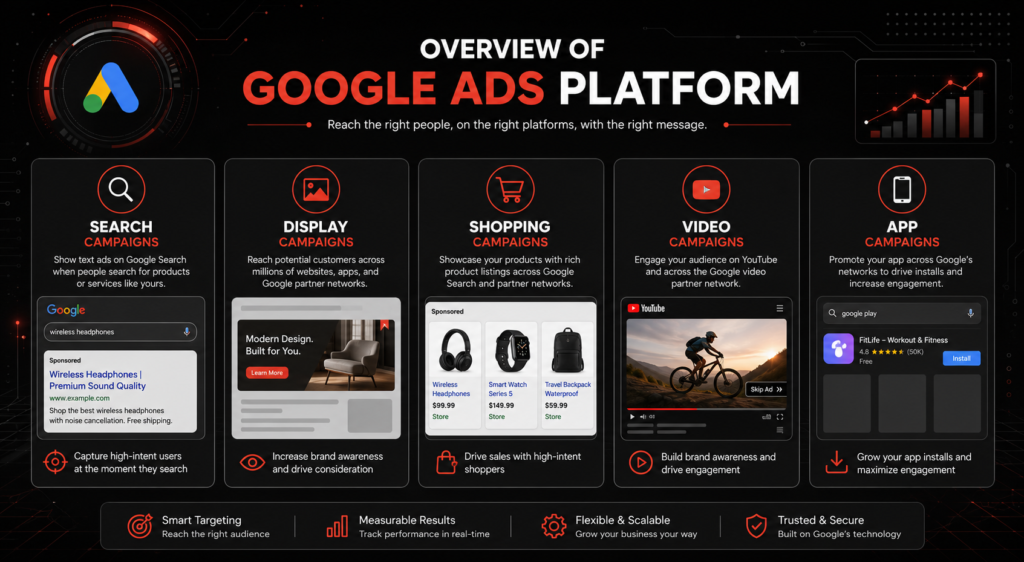
The Google Ads platform is Google’s advertising system, letting businesses pay to appear in search results, on websites across the web, on YouTube, inside apps, and in Google Shopping listings. It’s the modern version of a phone book ad, except it only shows up to people already looking for what you offer.
Types of Google Ads Campaigns
There are five main formats: Search Ads (text ads on the results page), Display Ads (banner-style ads across millions of partner websites), Shopping Ads (product listings with images and prices), Video Ads (mostly on YouTube), and App Ads (promoting app downloads across Google’s network).
Why Businesses Use Google Ads
Businesses use Google advertising because it’s fast. SEO can take six months to a year to show real movement; a Google Ads campaign can start generating clicks within hours of going live. That speed, paired with precise targeting, is exactly why Google Ads has become a default part of most digital marketing budgets.
How Does Google Ads Work?
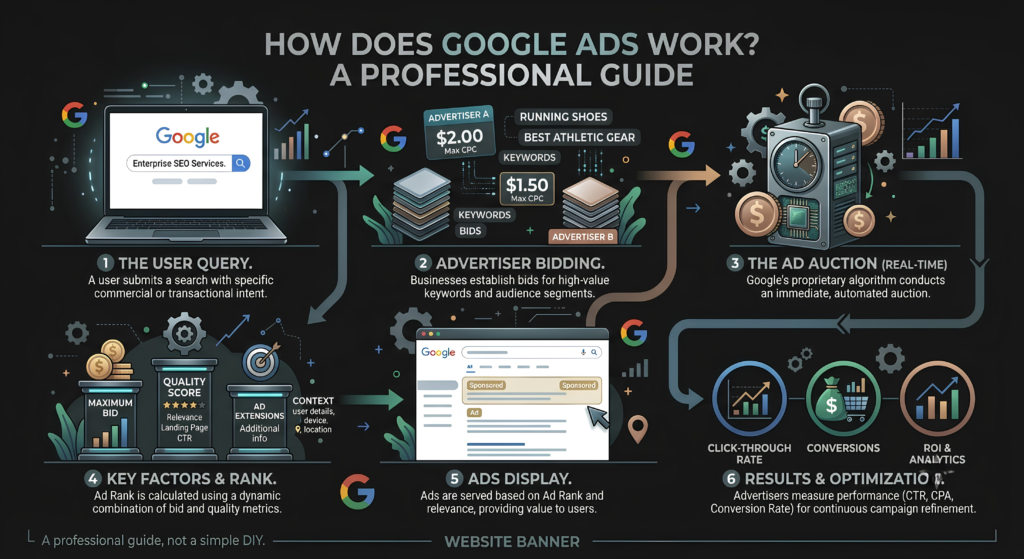
Choosing Keywords
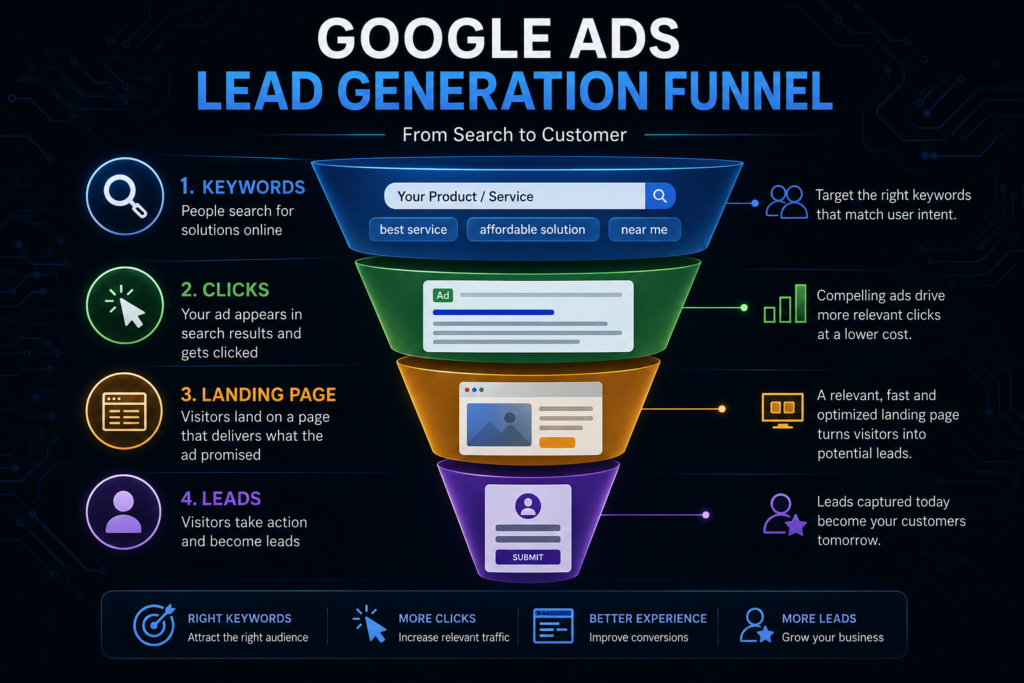
Everything starts with keyword targeting — picking the search terms you want your ad to appear for. A local bakery might target “custom birthday cakes,” while a software company might bid on “project management tool for remote teams.” Choose keywords too broad, and you’ll burn budget on irrelevant clicks fast.
Creating Ads
Next comes writing the actual ad — a headline, description, and a landing page URL, all built around whatever the searcher is actually trying to accomplish.
Entering the Google Ads Auction
Once your campaign is live, every relevant search triggers an entry into the Google Ads auction — a real-time process, happening in milliseconds, that decides which ads show and in what order.
Showing Ads to Searchers
If your ad wins its slot, it appears above or alongside the organic results. You’re charged only when someone actually clicks — not simply for showing up. That single detail is the piece most beginners get wrong first.
Put together, that’s roughly the step-by-step guide to Google Ads: keywords, ad creation, the auction, and delivery — repeated thousands of times a second across the platform.
Understanding the Google Ads Auction
What Happens When Someone Searches?
The moment someone hits enter on a search, Google scans every active campaign targeting that keyword and runs them through the auction in real time — the whole process finishes before the results page even finishes loading.
How the Auction Determines Winners
Winning isn’t just about who bids the most. Google Ads auction outcomes are based on a combination of your maximum bid and something called Quality Score, which measures how relevant and useful your ad actually is. A business bidding $3 with a strong Quality Score can beat a competitor bidding $6 with a weak one — this is genuinely one of the more misunderstood parts of how Google Ads auction works.
Ad Rank Explained
Ad Rank is the final number that decides placement: it’s your bid multiplied by your Quality Score, plus a few smaller factors like expected ad format impact. Understanding how Google Ads determines ad ranking is really the key to spending less while still ranking higher than competitors with deeper pockets.
Quick FAQ
No — in most campaign types, you only pay when someone actually clicks your ad, not simply for it being shown.
Yes. With some upfront planning around keywords and budget, beginners can run effective campaigns, though results tend to improve significantly with ongoing optimization.
They serve different purposes — Google Ads delivers immediate visibility, while SEO builds long-term organic traffic that doesn’t disappear the moment you stop paying.
How Google Ads Bidding Works
Manual Bidding
Manual bidding means you set your own maximum cost per click for each keyword. It gives you full control but requires ongoing attention to avoid overpaying or underbidding.
Automated Bidding
Automated bidding hands the wheel to Google’s algorithm, adjusting bids in real time based on the likelihood of a conversion, using signals manual bidding simply can’t process fast enough.
Smart Bidding Strategies
Smart Bidding — strategies like Target CPA or Target ROAS — uses machine learning across millions of auctions to optimize for actual outcomes, not just clicks. It typically needs some conversion data first (usually a few weeks of campaign history) before it really hits its stride.
Choosing the Right Strategy
New campaigns often start manual to build data, then shift to Smart Bidding once there’s enough conversion history to work with. The right bidding strategy really depends on your goals and how much cost per click (CPC) volatility your budget can handle.
How Quality Score Affects Ad Performance
What Is Quality Score?
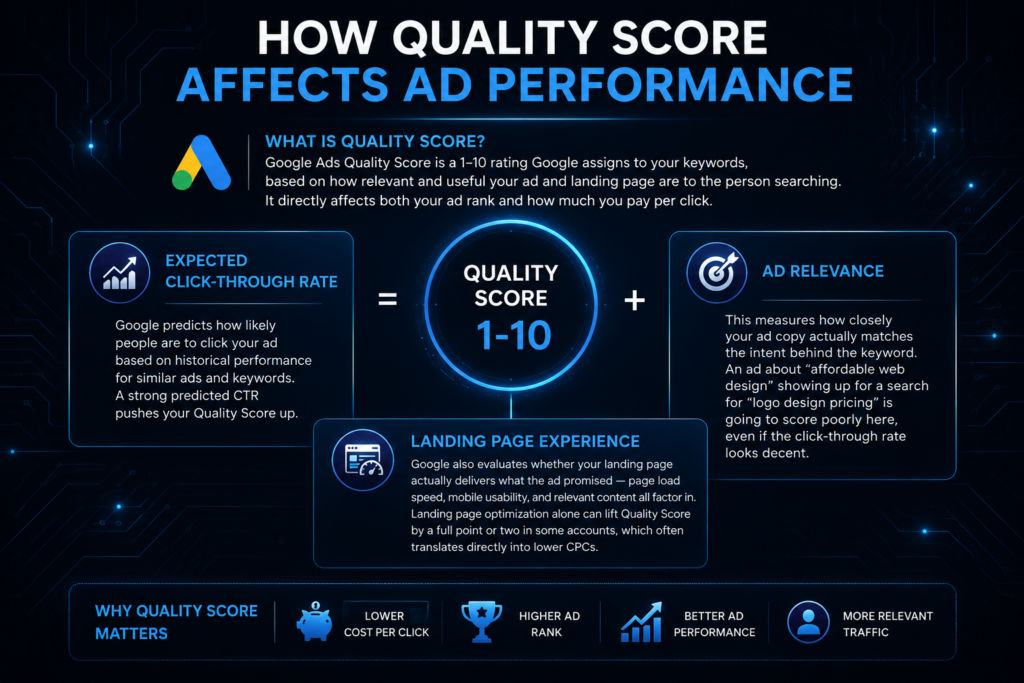
Google Ads Quality Score is a 1–10 rating Google assigns to your keywords, based on how relevant and useful your ad and landing page are to the person searching. It directly affects both your ad rank and how much you pay per click.
Expected Click-Through Rate
Google predicts how likely people are to click your ad based on historical performance for similar ads and keywords — a strong predicted CTR pushes your Quality Score up.
Ad Relevance
This measures how closely your ad copy actually matches the intent behind the keyword. An ad about “affordable web design” showing up for a search for “logo design pricing” is going to score poorly here, even if the click-through rate looks decent.
Landing Page Experience
Google also evaluates whether your landing page actually delivers what the ad promised — page load speed, mobile usability, and relevant content all factor in. Landing page optimization alone can lift Quality Score by a full point or two in some accounts, which often translates directly into lower CPCs.
Key Components of a Successful Google Ads Campaign
Campaign Goals
Before anything else, decide what “success” actually means — leads, sales, phone calls, app installs. Every setting downstream depends on this answer.
Keyword Research
Solid keyword research goes beyond guessing — using tools like Google’s Keyword Planner to find search volume, competition, and realistic CPC ranges before committing budget.
Ad Copy
Strong ad copy speaks directly to the searcher’s intent, includes a clear call to action, and — where possible — mentions specifics: pricing, turnaround time, guarantees, anything that sets the offer apart from the next ad in line.
Landing Pages
The landing page should match the ad’s promise exactly. If the ad says “free consultation,” the landing page better lead with a way to book one, not a generic homepage.
Conversion Tracking
Without conversion tracking properly installed, you’re optimizing a Google Ads campaign blind — no way to know which keywords, ads, or audiences are actually driving real business results versus just clicks.
Google Ads for Small Businesses
Budget-Friendly Advertising
A common question is how does Google Ads work for small businesses without a massive budget, and the honest answer is: it works fine with the right scope. A $500–$1,000/month campaign, tightly targeted around a handful of high-intent keywords, can outperform a much bigger, poorly targeted budget.
Local Customer Targeting
Location targeting lets a small business show ads only within a specific radius — a few miles around a storefront, or an entire metro area for a service business — so budget isn’t wasted reaching people who could never actually become customers.
Lead Generation Opportunities
For service-based businesses especially, Google Ads for small business accounts often becomes the most reliable lead generation channel available, simply because it reaches people at the exact moment they’re searching for a solution.
Quick FAQ
It varies a lot based on industry, competition, and goals — some local service businesses see solid results starting around $1,000/month, while competitive industries need more.
Yes — well-optimized campaigns, paired with a good landing page, can generate a consistent stream of qualified leads month over month.
Traffic can start flowing within hours of launch, but real optimization — the kind that lowers cost per lead meaningfully — usually takes a few weeks of data.
Google Ads Optimization Best Practices
Improving Click-Through Rate
Test headline variations regularly. Even a small CTR bump — say from 3% to 4% — compounds into meaningfully lower costs over time as Quality Score improves.
Using Negative Keywords
Negative keywords block your ads from showing on irrelevant searches — a landscaping company might exclude “landscaping jobs” or “landscaping courses” to avoid paying for clicks from job seekers and students.
Testing Ad Variations
Run at least two or three ad variations per ad group. Google’s system automatically rotates and favors the stronger performer, so ongoing Google Ads optimization is really just feeding it good options to choose from.
Optimizing Landing Pages
Slow-loading or cluttered landing pages tank conversion rates no matter how good the ad is. A one-second delay in mobile load time can meaningfully reduce conversions.
Monitoring Campaign Performance
Check performance weekly at minimum — pausing underperforming keywords, shifting budget toward what’s converting, and watching for Google Ads ROI trends before they become a real problem.
Responsive search ads, which let Google mix and match multiple headlines and descriptions automatically, have become a core part of most modern optimization strategies since they simplify a lot of this testing.
Common Google Ads Mistakes to Avoid
Broad Keyword Targeting
Targeting overly broad keywords like “software” instead of “invoicing software for freelancers” burns through budget fast on clicks that rarely convert.
Ignoring Conversion Tracking
Running paid search campaigns without tracking installed means every optimization decision is a guess dressed up as a strategy.
Sending Traffic to Poor Landing Pages
A great ad pointing to a slow, generic, or mismatched landing page is one of the fastest ways to waste PPC marketing budget — the click was expensive, and it converts nothing.
Not Testing Campaigns
Setting a campaign live and never touching it again is probably the single most common mistake in Google Ads optimization. Accounts that get reviewed and adjusted weekly consistently outperform ones left on autopilot.
Best Google Ads Strategies for Lead Generation
High-Intent Keywords
Focus budget on keywords that signal someone’s ready to act — “emergency plumber,” “get a quote,” “buy now” — rather than broad, top-of-funnel research terms.
Audience Targeting
Layer in audience signals — in-market audiences, custom intent audiences, and demographics — to sharpen who actually sees the ad beyond just the keyword itself.
Remarketing Campaigns
Remarketing ads target people who already visited your site but didn’t convert — these audiences typically convert at a noticeably higher rate than cold traffic, since they already know who you are.
Conversion Optimization
Continuously test landing pages, forms, and calls to action. Cutting a lead form from seven fields down to three can meaningfully boost completion rates on its own.
These four pieces make up most of the best Google Ads strategies for lead generation, and they apply whether you’re running a modest local account or a much larger digital advertising program.
How Much Does Google Ads Cost for Businesses?
Factors That Affect Cost
Cost depends heavily on industry competitiveness, keyword volume, Quality Score, and geographic targeting — legal and insurance keywords, for instance, tend to run far higher CPCs than local retail terms.
Cost Per Click
Cost per click (CPC) can range anywhere from under $1 for low-competition local terms to $50 or more in highly competitive industries like personal injury law. Most small business campaigns land somewhere in a much more moderate range.
Budget Planning Tips
Start with a test budget, gather a few weeks of data, then scale what’s actually working rather than guessing at a number upfront. (For a full cost breakdown by industry, see our dedicated guide on how much Google Ads costs.)
Why Businesses in Austin, TX Choose Professional Google Ads Management
Benefits of Hiring a Google Ads Agency
Running Google Ads well takes ongoing attention — bid adjustments, keyword refinement, ad testing, budget shifts. A dedicated Google Ads agency handles that day-to-day work so business owners aren’t relearning the platform every time Google rolls out a new feature.
Why Local Expertise Matters
Austin’s advertiser competition has grown alongside the city itself, and CPCs in crowded local categories — home services, legal, real estate — have climbed as more businesses compete for the same searches. An agency that understands the local market can build sharper geographic targeting and more realistic budget expectations than a generic, out-of-state provider running the same template everywhere.
How Flash Digital Helps Austin Businesses Grow
Flash Digital, based in Austin, TX, manages Google Ads campaigns built around real conversion data rather than guesswork — combining keyword research, Quality Score optimization, and local audience targeting to help Austin businesses generate leads without wasting budget on clicks that never convert. If you’ve searched for Google Ads management services in Austin TX, or typed “Google Ads agency near me” into Google after watching a self-managed campaign underperform, that’s exactly the gap Flash Digital works to close for local businesses.
Building Successful Google Ads Campaigns That Drive Results
So, how does Google Ads work, in the end? It’s an auction — but one where relevance and quality can beat a bigger budget, not just outright spending power. Every ad that shows up on a results page got there through a real-time mix of bid, Quality Score, and Ad Rank, decided in the time it takes a page to load.
Understanding that mechanism changes how you approach the whole platform. Bidding strategy and Quality Score aren’t separate levers — they work together, and neglecting one quietly undermines the other. The same goes for optimization: testing ad copy, refining keywords, and fixing landing pages isn’t a one-time setup task, it’s the ongoing work that actually drives Google Ads ROI over time.
For businesses without the bandwidth to manage all of that in-house, working with an experienced team offering Google Ads management services often makes the difference between a campaign that technically runs and one that actually grows the business. Whether you’re just getting familiar with the Google Ads platform or looking to fix an underperforming account, the fundamentals in this guide are the same ones behind every successful campaign.
Future Internal Linking Questions
- What is Google Ads?
- How does Google Ads work step by step?
- What is the Google Ads auction?
- How do remarketing ads work?
- How can businesses improve Google Ads Quality Score?
- How does Google Ads determine ad ranking?
- What is Google Ads Quality Score?
- How does Google Ads bidding work?
- What is cost per click (CPC)?
- What are responsive search ads?